The Cortex: Architecting Memory for AI Agents
Part 2 of the Engineering the Agentic Stack series
State is what separates a chatbot from an agent. Without memory, every interaction starts from zero. The agent cannot pause and resume, cannot learn from past sessions, cannot personalize. Part 1 covered the cognitive engine that decides how an agent thinks. This post is about the infrastructure that determines what it remembers.
I'll walk through the memory architecture of the Market Analyst Agent, showing how hot and cold memory layers work together for checkpointing, pause/resume, and cross-session learning. Then I'll cover a third tier — document memory — that doesn't get much theoretical treatment but turns up everywhere in practice.
TL;DR: Agent memory splits into three tiers. Hot memory is thread-level checkpoints in Redis or PostgreSQL for pause/resume. Cold memory is cross-session knowledge in a vector store or key-value backend for personalization. Document memory is human-readable files the agent reads and writes for persistent project knowledge. LangGraph's checkpoint system handles the hot layer natively. For cold memory, vector search with Qdrant gives you semantic recall; a key-value store is enough for structured facts. For document memory, a file-based store gives you debuggability and zero embedding infrastructure. Pick the combination that matches your latency and durability needs.
Why memory matters
A stateless agent is fancy autocomplete. It takes a request, returns a response, forgets everything. That works for single-turn Q&A. It breaks the moment you need:
- Pause and resume: a user starts a research task, closes their laptop, and comes back tomorrow. Without checkpointed state, the agent restarts from scratch.
- Multi-turn coherence: over a long conversation the agent has to remember what tools it called, what data it gathered, and what plan steps it finished.
- Personalization: a returning user expects the agent to know their risk tolerance, preferred analysis depth, and past interactions.
- Human-in-the-loop (HITL): the agent drafts a report and waits for approval. The "waiting" state has to survive process restarts.
Take the Market Analyst Agent from Part 1. A user asks "Analyze NVDA". The agent builds a plan, calls five tools, gathers data, drafts a report. The user replies "looks good, but add competitor analysis." Without checkpointed state, the agent has no idea what "looks good" refers to and has to start over. With a checkpoint store, it loads the state from the last node, including the gathered research, and just adds a competitor step.
Now imagine the same user comes back a week later: "Update my NVDA analysis." Without long-term memory, the agent doesn't know this user prefers conservative risk assessments or that they're interested in semiconductor stocks. With a vector-backed memory store, it recalls those facts and personalizes the response without re-asking.
LangGraph splits this cleanly. Every graph execution runs inside a thread — a single conversation or task. State within a thread is working memory. State that persists across threads is long-term memory. The engineering question is which storage backend to use for each.
A taxonomy of agent memory
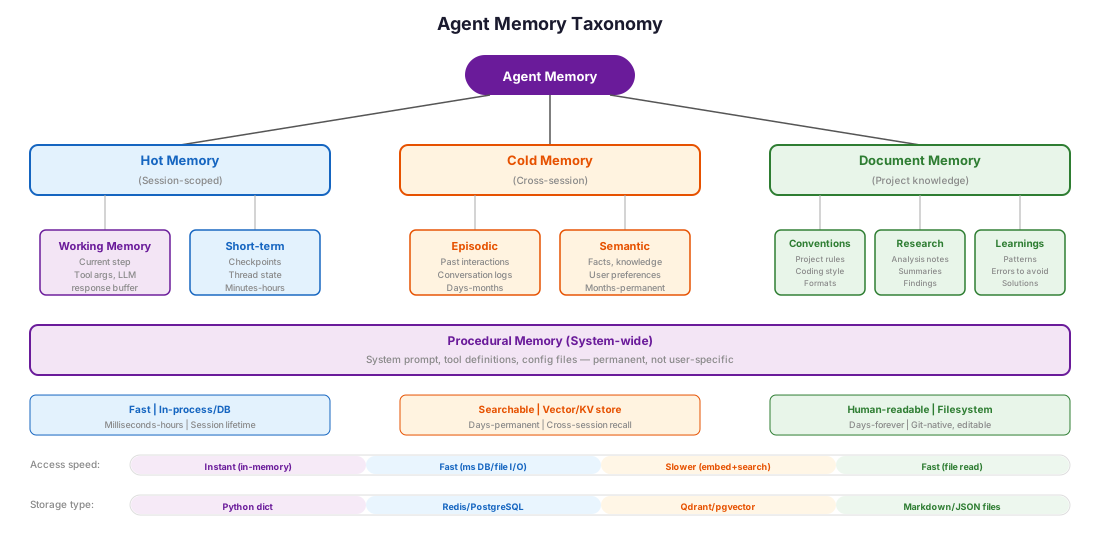
Before getting into implementation, it helps to classify what agents need to remember. The CoALA framework (Sumers, Yao et al., 2023) is the standard taxonomy and draws on cognitive science. I introduced memory scoping in my context engineering post; here I expand it into six categories:
| Memory Type | Scope | Lifetime | Example | Storage Pattern |
|---|---|---|---|---|
| Working | Current step | Milliseconds | Tool call arguments, current LLM response | In-process (Python dict) |
| Short-term | Current thread | Minutes–hours | Conversation history, plan progress, gathered data | Checkpoint store |
| Episodic | Cross-thread | Days–months | "Last week the user asked about NVDA earnings" | Vector store / KV store |
| Semantic | Cross-thread | Months–permanent | "User prefers conservative investments" | Vector store / KV store |
| Document | Cross-thread | Days–permanent | Project notes, research summaries, learned patterns | File store (Markdown/JSON) |
| Procedural | System-wide | Permanent | "When analyzing stocks, always check SEC filings" | Config / system prompt |
Working memory is what the LLM is actively reasoning with right now: Python variables in the current function, the contents of the context window, tool call arguments mid-execution. It's the fastest and most ephemeral layer. Nothing persists beyond the current step. Working memory is bounded by the model's context window, which makes it the actual bottleneck. Everything the agent "knows" at decision time has to fit here, whether it came from the checkpoint store, a vector query, or a file read. The other tiers exist to feed the right information into working memory at the right time.
Short-term memory is the checkpoint store that LangGraph writes after every node execution. Episodic and semantic memory are long-term stores that persist across threads. Document memory is structured knowledge the agent accumulates over time — project notes, research summaries, learned conventions — stored in human-readable files that both the agent and the developer can inspect and edit. Procedural memory is encoded in the system prompt and tool definitions; it doesn't change per user.
In practice this collapses to three tiers: hot memory (working + short-term) for the current session, cold memory (episodic + semantic) for cross-session recall, and document memory for accumulated project knowledge that benefits from being human-readable and directly editable.
Most frameworks and surveys focus on the hot/cold split and skip document memory, despite how widely adopted it is. The CoALA framework classifies memory as working, episodic, semantic, and procedural; no mention of files. The Memory in the Age of AI Agents survey covers vector stores and knowledge graphs but not document files. LangGraph's docs cover checkpoints and the Store interface but have no native concept of file-based memory.
In practice, document memory is now a default in AI coding assistants. Claude Code, Cursor, Windsurf, and Devin all treat file-based memory as a core feature. And the pattern is spreading beyond coding: open-world game agents store reusable skills as code libraries (Voyager), competition-winning enterprise agents iterate on procedural prompt documents across runs (ECR3 winning approaches), and web automation agents synthesize reusable workflow APIs from successful episodes (Agent Workflow Memory). The advantages — debuggability, version control, zero infrastructure — aren't coding-specific.
A useful observation from the same survey: agent memory is not the same as RAG or context engineering. The distinguishing feature is that the agent itself does the read/write operations. It decides what to remember and what to forget, instead of relying on a fixed retrieval pipeline.
The Generative Agents paper (Park et al., 2023) showed how far this can go: simulated agents that stored, reflected on, and retrieved their own memories produced strikingly human-like behavior. The architectural pattern — a memory stream with retrieval scored by recency, importance, and relevance — is the template most modern agent memory systems still build on.
Short-term "hot" memory: the checkpoint store
Every time a LangGraph node executes, the framework serializes the full graph state and writes it to a checkpoint store. That's the foundation for pause/resume, time-travel debugging, and HITL workflows.
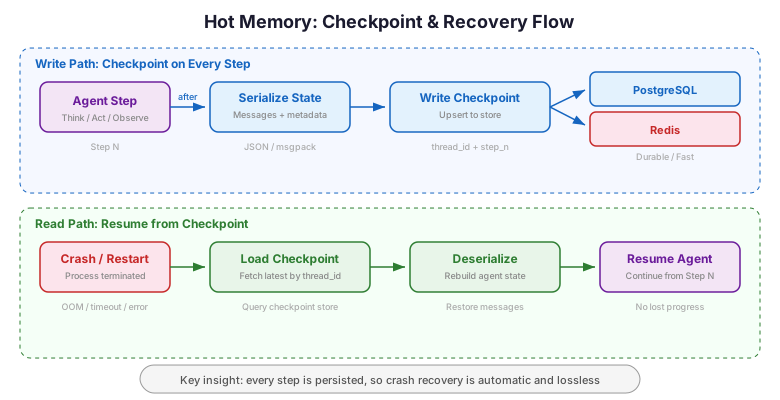
A checkpoint contains everything: the AgentState from Part 1 (messages, plan steps, research data, execution mode), plus LangGraph metadata like which node produced it and a monotonically increasing sequence number. When the graph resumes — after a HITL interrupt or a process restart — it loads the latest checkpoint and continues from exactly where it stopped.
How LangGraph checkpointing works
LangGraph's BaseCheckpointSaver is a simple interface: put() writes a checkpoint, get_tuple() reads the latest one for a thread, list() returns the history. Every checkpoint is keyed by (thread_id, checkpoint_ns, checkpoint_id), where thread_id identifies the conversation, checkpoint_ns handles subgraph namespacing, and checkpoint_id is a unique version.
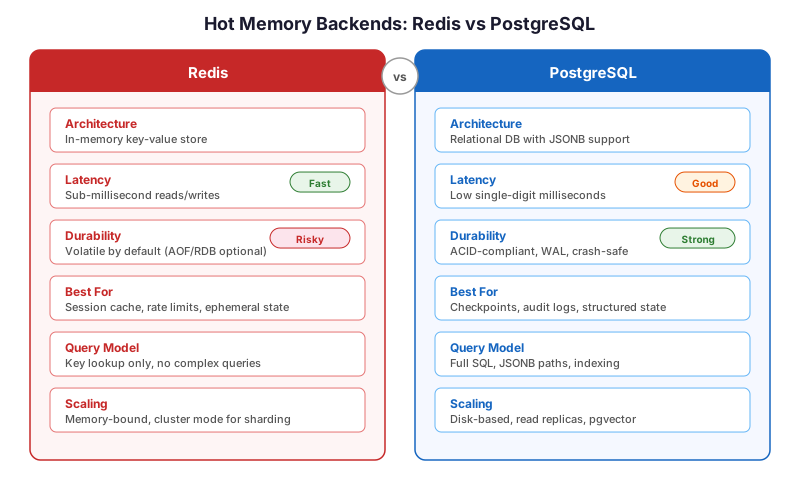
The decision that matters is which backend to put behind it. LangGraph ships two production options: PostgreSQL and Redis.
PostgreSQL vs Redis
| Dimension | PostgreSQL (langgraph-checkpoint-postgres) |
Redis (langgraph-checkpoint-redis) |
|---|---|---|
| Read latency | ~0.65ms | ~0.095ms |
| Write latency | ~2ms (unlogged) to 10ms (with WAL) | ~0.095ms |
| Throughput | ~15K txn/s | ~893K req/s |
| Durability | Full ACID, WAL + replication | Configurable (AOF/RDB), risk of data loss |
| Checkpoint history | Full history (time-travel, audit) | Configurable retention via maxcount |
| Operational cost | Moderate (standard RDBMS ops) | Higher (RAM-bound, memory management) |
| Scaling pattern | Vertical + read replicas | Horizontal (Redis Cluster) |
| Best for | Compliance, audit trails, durability-first | Low-latency, high-throughput, real-time |
Latency benchmarks from CyberTec and RisingWave comparisons.
PostgreSQL: the durable default
PostgreSQL is the safer default for most teams. Checkpoints survive crashes, you get full transaction semantics, and the checkpoint history makes time-travel debugging straightforward.
From checkpointer_setup.py:
from langgraph.checkpoint.postgres.aio import AsyncPostgresSaver

async def create_postgres_checkpointer(connection_string: str) -> AsyncPostgresSaver:
    """Create a PostgreSQL-backed checkpoint store.

    PostgreSQL gives us ACID guarantees — if a checkpoint write succeeds,
    the state is durable even if the process crashes immediately after.
    """
    checkpointer = AsyncPostgresSaver.from_conn_string(connection_string)

    # Create the checkpoint tables if they don't exist.
    # This is idempotent — safe to call on every startup.
    await checkpointer.setup()

    return checkpointer

# Usage: wire into the graph compilation
checkpointer = await create_postgres_checkpointer(
    "postgresql://user:pass@localhost:5432/agent_memory"
)
graph = create_graph(checkpointer=checkpointer)

# Every invoke/stream call now persists state automatically
config = {"configurable": {"thread_id": "user-123-session-1"}}
result = await graph.ainvoke({"messages": [HumanMessage(content="Analyze NVDA")]}, config)

# Resume later — loads the latest checkpoint for this thread
result = await graph.ainvoke({"messages": [HumanMessage(content="approved")]}, config)
The AsyncPostgresSaver uses the langgraph-checkpoint-postgres package, which creates three tables: checkpoints (the serialized state), checkpoint_blobs (large binary data), and checkpoint_writes (pending writes for crash recovery). The schema supports concurrent access and uses advisory locks to prevent write conflicts.
Redis: when latency is the bottleneck
When sub-millisecond checkpoint latency matters (real-time conversational agents, high-frequency tool loops), Redis is the better choice.
From checkpointer_setup.py:
from langgraph.checkpoint.redis.aio import AsyncRedisSaver

async def create_redis_checkpointer(redis_url: str) -> AsyncRedisSaver:
    """Create a Redis-backed checkpoint store.

    Redis stores checkpoints in memory for sub-millisecond access.
    Trade-off: less durable than PostgreSQL unless AOF is enabled.
    """
    checkpointer = AsyncRedisSaver.from_conn_string(redis_url)

    # Initialize Redis data structures
    await checkpointer.setup()

    return checkpointer

# Usage: same graph API, different backend
checkpointer = await create_redis_checkpointer("redis://localhost:6379")
graph = create_graph(checkpointer=checkpointer)
The AsyncRedisSaver from langgraph-checkpoint-redis stores checkpoints as JSON documents keyed by thread ID. The v0.1.0 redesign replaced multiple search operations with a single JSON.GET call, significantly reducing latency. Redis 8.0+ includes RedisJSON and RediSearch by default — no extra modules to install.
For memory-constrained deployments, ShallowRedisSaver stores only the latest checkpoint per thread — no history, but minimal RAM usage. Use this when you need pause/resume but don't need time-travel debugging.
When to use which
Use PostgreSQL when:
- You need full checkpoint history for compliance or auditing
- Durability is non-negotiable (financial services, healthcare)
- You already run PostgreSQL in your stack
- Your agent runs long tasks where losing state means hours of recomputation
- You want a unified data store — PostgreSQL with pgvector can serve as a single backend for checkpoints, long-term memory, and vector search, simplifying your infrastructure
Use Redis when:
- Checkpoint latency is your bottleneck (real-time chat, streaming UX)
- You're building voice bots — STT-to-LLM-to-TTS pipelines need sub-millisecond state access
- You need horizontal scaling across many concurrent threads
- High-concurrency fan-out patterns where multiple agents share state
- Short-lived sessions where losing a checkpoint is recoverable
- You want semantic caching to reduce redundant LLM calls (Redis LangCache caches semantically similar queries to avoid repeated LLM calls)
Other options: langgraph-checkpoint-sqlite works for local development and single-process deployments. For AWS-native stacks, langgraph-checkpoint-aws provides a DynamoDBSaver with intelligent payload handling — small checkpoints (<350 KB) stay in DynamoDB, large ones are automatically offloaded to S3. Serverless pricing and no infrastructure to manage make it attractive for variable-load deployments.
Long-term memory: remembering across sessions
Hot memory handles the current conversation. But what about the user who comes back next week? Long-term memory stores facts, preferences, and interaction history that persist across threads.
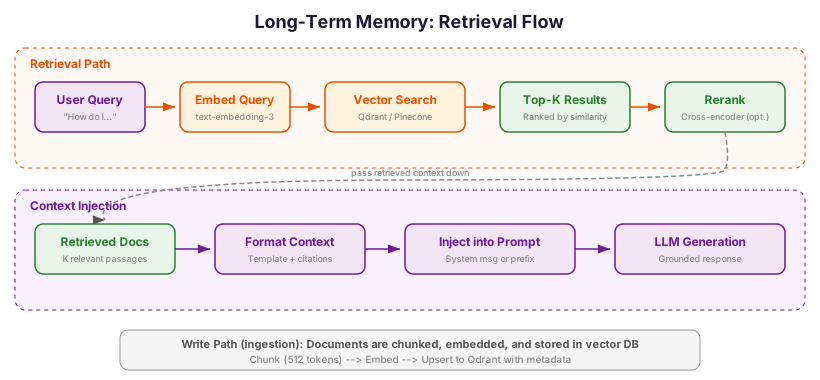
LangGraph provides a Store interface for cross-thread memory via its BaseStore class. Each memory item is a (namespace, key) pair with a JSON value and optional vector embedding. The namespace typically encodes the user or organization: ("user", "user-123", "preferences").
Vector storage: semantic recall with Qdrant
When the agent needs to recall unstructured facts ("What did the user say about their investment timeline?"), vector search provides semantic recall. Instead of exact key lookups, the agent queries by meaning.
Qdrant is a purpose-built vector database written in Rust that handles embedding storage, indexing (HNSW), and filtered search. I covered HNSW and its trade-offs in detail in my search ranking post. Qdrant also offers an MCP server that acts as a semantic memory layer — useful if your agent framework supports the Model Context Protocol.
From memory_store.py:
from qdrant_client import QdrantClient
from qdrant_client.models import PointStruct, Distance, VectorParams
from langchain_anthropic import ChatAnthropic
import hashlib
import json

class UserMemoryStore:
    """Long-term memory backed by Qdrant vector search.

    Stores user facts as embedded vectors for semantic retrieval.
    Each fact is a short natural-language statement about the user.
    """

    def __init__(self, qdrant_url: str, collection_name: str = "user_memory"):
        self.client = QdrantClient(url=qdrant_url)
        self.collection_name = collection_name
        self._ensure_collection()

    def _ensure_collection(self):
        """Create the collection if it doesn't exist."""
        collections = [c.name for c in self.client.get_collections().collections]
        if self.collection_name not in collections:
            self.client.create_collection(
                collection_name=self.collection_name,
                vectors_config=VectorParams(
                    size=1536,  # text-embedding-3-small dimensions
                    distance=Distance.COSINE,
                ),
            )

    def store_fact(self, user_id: str, fact: str, embedding: list[float]):
        """Store a user fact with its embedding."""
        point_id = hashlib.md5(f"{user_id}:{fact}".encode()).hexdigest()
        self.client.upsert(
            collection_name=self.collection_name,
            points=[PointStruct(
                id=point_id,
                vector=embedding,
                payload={"user_id": user_id, "fact": fact},
            )],
        )

    def recall(self, user_id: str, query_embedding: list[float], top_k: int = 5):
        """Retrieve the most relevant facts for a user given a query."""
        results = self.client.query_points(
            collection_name=self.collection_name,
            query=query_embedding,
            query_filter={"must": [{"key": "user_id", "match": {"value": user_id}}]},
            limit=top_k,
        )
        return [hit.payload["fact"] for hit in results.points]
The flow is: (1) after each conversation, an LLM extracts key facts from the interaction ("user has high risk tolerance", "user is interested in semiconductor stocks"), (2) facts are embedded and stored in Qdrant, (3) at the start of the next conversation, the agent queries Qdrant with the user's new message to recall relevant context.
Retrieval scoring: beyond cosine similarity
Raw cosine similarity is a starting point, but production memory systems need richer retrieval. The Generative Agents paper (Park et al., 2023) introduced a scoring function that combines three signals:
- Recency: Rule-based decay so recent memories score higher. An exponential decay function makes a fact from yesterday outrank an equivalent fact from six months ago.
- Importance: LLM-rated significance on a 1-10 scale. "User's portfolio is down 40%" scores higher than "user said hello."
- Relevance: Embedding cosine similarity between the query and the stored fact.
The final retrieval score is a weighted sum: score = alpha * recency + beta * importance + gamma * relevance. That keeps fresh, important facts from being buried under stale but semantically similar ones. For the Market Analyst Agent, I weight relevance highest (0.5) with recency (0.3) and importance (0.2), since the user's current query intent matters most. These are starting-point weights adapted from the Generative Agents paper (which used equal weighting); I found emphasizing relevance worked better for financial analysis queries, but the values are intuition-based, not empirically optimized.
Alternatives to vector search
Vector search is powerful but not always the right tool. Here's when to use alternatives:
| Approach | Best For | Latency | Complexity |
|---|---|---|---|
| Vector search (Qdrant) | Semantic recall of unstructured facts | 5–20ms | Medium |
| Key-value store (Redis) | Structured user profiles, preferences | <1ms | Low |
| Document store (files) | Project knowledge, agent-managed notes | 1–5ms | Low |
| Full-text search (PostgreSQL GIN index) | Keyword-based recall of conversation history | 2–10ms | Low |
| Knowledge graph (Neo4j) | Entity relationships, multi-hop reasoning | 10–50ms | High |
| Hybrid (vector + keyword) | Best recall when query intent varies | 10–30ms | Medium |
Key-value stores work well for structured data. If your long-term memory is a user profile — risk tolerance, investment horizon, preferred sectors — a Redis hash or PostgreSQL JSONB column is simpler and faster than embedding and querying vectors. Use vector search when the memory is unstructured and the retrieval query varies in phrasing.
LangGraph's built-in Store provides a namespace-based key-value interface with optional vector search. The BaseStore API is simple: put(), get(), search(), and delete() with hierarchical namespace scoping. Three implementations are available:
InMemoryStore— for development and testing (data lost on process exit)PostgresStore— production persistent store with full SQL queryingAsyncRedisStore— cross-thread memory with vector search, TTL support, and metadata filtering
The index configuration enables vector search over stored items using a configurable embedding model. For many use cases, this built-in store is sufficient without reaching for a dedicated vector database.
from langgraph.store.memory import InMemoryStore

# Create a store with vector search enabled
store = InMemoryStore(
    index={
        "dims": 1536,
        "embed": my_embedding_function,  # e.g., OpenAI text-embedding-3-small
    }
)

# Store a user preference (namespace scopes to user)
await store.aput(
    namespace=("user", "user-123", "preferences"),
    key="risk-profile",
    value={"risk_tolerance": "high", "horizon": "long-term"},
)

# Semantic search across user's memories
results = await store.asearch(
    namespace=("user", "user-123"),
    query="What is their investment style?",
    limit=5,
)
Choosing a long-term memory strategy
Start with key-value if your memory is structured and well-defined (user profiles, settings, named entities). Add vector search when you need semantic retrieval over unstructured facts or when the query phrasing varies unpredictably.
Knowledge graphs earn their keep when relationships between entities matter, e.g. "Which companies did the user ask about that are competitors of NVDA?" The most interesting recent project here is Graphiti (by Zep), which builds a temporally-aware knowledge graph that tracks when facts were true, not just what was true. Every edge carries validity intervals, so a change to the user's risk tolerance invalidates the old value rather than silently overwriting it. Graphiti reports 94.8% accuracy on the DMR benchmark, and its bi-temporal model handles the stale memory problem at the data layer.
The catch is operational. Running a graph database is non-trivial, and for most agent applications vector search with metadata filtering covers the same ground with less infrastructure.
Managed memory frameworks like Mem0 and Letta (formerly MemGPT) handle the extraction-consolidation-retrieval pipeline for you. Mem0's approach is notable: an LLM extracts candidate memories, a decision engine compares each new fact against existing entries in the vector store, and a resolver decides to add, update, or delete, which keeps the memory store coherent and non-redundant. Letta takes an operating-systems angle: agents manage their own context window using memory management tools, autonomously moving data between "core memory" (in-context) and "archival memory" (out-of-context). Both are worth evaluating if you want faster time-to-production and don't need full control over the memory pipeline.
Document memory: the agent's filing cabinet
The pattern is widespread in practice but underexplored in academic literature. Framework documentation covers vector stores, knowledge graphs, and context management in depth, but file-based memory barely gets a footnote. That's a gap worth filling, because this is how the most effective AI coding assistants actually persist knowledge. Letta's benchmark found a plain filesystem approach scored 74.0% on the LoCoMo conversational memory benchmark, beating several specialized memory libraries. Frontier models are already trained on agentic coding tasks and handle file operations natively, so the pattern matches their strengths.
The shift came from longer context windows. In 2023-2024, with 8k-32k tokens to work with, you had no choice but to shred documents into chunks and embed them. With 1M+ token windows (Gemini 1.5, Claude 4), it's usually more effective to let the agent read the whole file than to guess which chunks are relevant. The operational story is also simpler. You can read, edit, and git diff a Markdown file. You cannot git diff a vector database.
Vector stores and key-value backends handle semantic recall and structured lookups well. But there's a third category of agent knowledge that neither serves cleanly: accumulated project context, the conventions, research notes, and decisions that the agent needs across sessions and that benefit from being human-readable and version-controlled.
This is document memory: the agent reads and writes structured files (Markdown, JSON, YAML) to a known directory. No embeddings, no database, no infrastructure. Just files on disk that both the agent and the developer can cat, grep, git diff, and edit by hand.
Why files?
For long-lived agent workflows, the most effective pattern I've seen isn't a vector database. It's a directory of well-organized notes. Consider what happens when a coding agent works on a project over weeks:
- It learns that the project uses Pydantic v2, not v1
- It discovers that tests must run with
pytest -x --tb=short - It accumulates knowledge about the codebase architecture
- It learns the developer's preferences ("always use
pathlib, neveros.path")
These facts are too structured for vector search (you need exact recall, not fuzzy similarity) and too numerous for a key-value store (they form interconnected documents, not isolated facts). They're also facts the developer wants to see and edit directly. If the agent learns something wrong, you open the file and fix it.
This is how Claude Code's CLAUDE.md and .claude/ directory work. The agent reads project-level CLAUDE.md files for conventions and instructions, and writes to ~/.claude/MEMORY.md for cross-session learnings. The files are plain Markdown: you read them, edit them, commit them to git, share them with your team. Cursor's .cursorrules and Windsurf's .windsurfrules follow the same pattern: plain-text files the agent loads on startup to pick up project context.
Implementing a file memory store
The implementation is deliberately simple. The agent gets four operations: write a document, read a document, list available documents, and search across documents by keyword.
From file_memory.py:
from pathlib import Path
import json
import fnmatch

class FileMemory:
    """Document memory backed by the local filesystem.

    Stores agent knowledge as human-readable files organized by topic.
    No embeddings, no database — just files that both the agent and
    the developer can read, edit, and version-control.
    """

    def __init__(self, base_dir: str | Path):
        self.base_dir = Path(base_dir)
        self.base_dir.mkdir(parents=True, exist_ok=True)

    def write_doc(self, path: str, content: str, metadata: dict | None = None):
        """Write or overwrite a document at the given path.

        Paths are relative to base_dir. Directories are created automatically.
        Metadata (if provided) is stored as a JSON sidecar file.
        """
        full_path = self.base_dir / path
        full_path.parent.mkdir(parents=True, exist_ok=True)
        full_path.write_text(content, encoding="utf-8")

        if metadata:
            meta_path = full_path.with_suffix(full_path.suffix + ".meta")
            meta_path.write_text(json.dumps(metadata, indent=2), encoding="utf-8")

    def read_doc(self, path: str) -> str | None:
        """Read a document by path. Returns None if not found."""
        full_path = self.base_dir / path
        if full_path.exists():
            return full_path.read_text(encoding="utf-8")
        return None

    def list_docs(self, pattern: str = "**/*") -> list[str]:
        """List documents matching a glob pattern."""
        return [
            str(p.relative_to(self.base_dir))
            for p in self.base_dir.glob(pattern)
            if p.is_file() and not p.name.endswith(".meta")
        ]

    def search_docs(self, query: str, pattern: str = "**/*.md") -> list[dict]:
        """Search documents by keyword. Returns matching files with context.

        This is intentionally simple — grep-style keyword search.
        For semantic search, use a vector store instead.

        NOTE: This is a sketch for demonstration. A simple substring check
        won't scale beyond a few hundred documents. For production with 500+
        documents, use TF-IDF/BM25 scoring (e.g., rank_bm25) or a full-text
        search backend (PostgreSQL GIN index, Elasticsearch).
        """
        results = []
        for path in self.base_dir.glob(pattern):
            if not path.is_file() or path.name.endswith(".meta"):
                continue
            content = path.read_text(encoding="utf-8")
            if query.lower() in content.lower():
                # Return the paragraph containing the match for context
                for paragraph in content.split("\n\n"):
                    if query.lower() in paragraph.lower():
                        results.append({
                            "path": str(path.relative_to(self.base_dir)),
                            "match": paragraph.strip()[:500],
                        })
        return results
Folder structure
Most of the value of document memory comes from how the directory is laid out. Here's the structure I use for the Market Analyst Agent:
.agent-memory/
    README.md                  # What this directory is, for human readers
    user-profiles/
        user-123.md            # Preferences, history, risk profile
        user-456.md
    research/
        NVDA-2026-02.md        # Research notes from recent analysis
        TSLA-2026-01.md
    conventions/
        analysis-format.md     # How to structure analysis reports
        data-sources.md        # Preferred data sources and API patterns
    learnings/
        common-errors.md       # Mistakes the agent has learned to avoid
        tool-patterns.md       # Effective tool call sequences
Every file is Markdown. Every file's purpose is obvious from its path. You can git diff the entire memory directory to see what the agent learned in a session, git revert a bad learning, or copy the directory to another project. Try doing any of that with a Qdrant collection.
When to use document memory vs vector vs key-value
The three memory backends serve different access patterns:
| Dimension | Vector Store | Key-Value Store | Document Store |
|---|---|---|---|
| Query pattern | "Find facts similar to X" | "Get the value for key" | "Read the doc at path" |
| Best for | Unstructured, varied recall | Structured lookups | Project context, notes |
| Human readable | No (embeddings) | Partially (JSON) | Yes (Markdown) |
| Debuggable | Hard (similarity scores) | Easy (exact keys) | Trivial (open the file) |
| Version controllable | No | Possible | Yes (git-native) |
| Embedding infrastructure | Required | Not needed | Not needed |
| Scales to | Millions of facts | Millions of keys | Thousands of documents |
| Search capability | Semantic similarity | Exact match | Keyword / path-based |
Use document memory when:
- The agent accumulates project knowledge over multiple sessions
- Developers need to inspect, edit, or override what the agent "knows"
- The knowledge is structured as documents (notes, summaries, conventions) rather than isolated facts
- You want git-based versioning of agent memory
- Zero infrastructure is a hard requirement
Use vector stores when:
- You need fuzzy semantic retrieval ("find memories related to X")
- The query phrasing varies unpredictably
- You have thousands to millions of individual facts
Use key-value stores when:
- You need exact, fast lookups for structured data (user profiles, settings)
- The data schema is well-defined
In practice, production agents often combine all three. The Market Analyst Agent uses PostgreSQL checkpoints for hot memory, Qdrant for semantic user fact recall, and a file-based document store for project conventions and research notes.
Real-world examples
The pattern is already widespread in AI coding assistants:
- Claude Code reads
CLAUDE.mdfiles from the project root and parent directories, and writes to~/.claude/MEMORY.mdfor cross-session learnings. The entire memory system is plain Markdown files that you commit alongside your code. - Cursor loads
.cursorrulesfiles for project-specific agent instructions: coding conventions, framework preferences, architectural decisions. - Windsurf uses
.windsurfrulesfiles plus amemories/directory where the agent stores learned patterns from your codebase. - Anthropic's memory tool for the Claude API provides
create_memory,read_memory,update_memory, anddelete_memoryoperations implemented client-side. Your application decides where the files actually live (local disk, S3, database).
The common thread: all of these store agent knowledge as human-readable text files with explicit read/write operations. No embeddings. No vector infrastructure. The agent decides what to write, the developer can see and edit everything, and the whole system fits in a git diff.
Beyond coding assistants
Document memory is not limited to coding agents. The pattern shows up across very different agent domains:
-
Open-world game agents: Voyager (Wang et al., 2023) builds a persistent skill library of verified JavaScript programs that a Minecraft agent accumulates over time, collecting 3.3x more unique items and reaching milestones 15.3x faster than baselines. Skills transfer across new worlds without retraining. JARVIS-1 extends this with a multimodal memory that combines textual plans and visual observations, with a 5x success rate on the hardest tasks.
One distinction worth making here: skill libraries are executable memory (code files imported and run), while document memory in coding assistants is declarative (Markdown injected into prompts). The failure modes differ. Bad executable code crashes the agent; bad declarative text leads to reasoning errors. But the storage pattern and the operational benefits (debuggability, version control) are the same.
-
Enterprise workflow automation: The ECR3 competition winners used document memory for iterative prompt refinement. One winning team's Analyzer and Versioner agents iterated through 80 prompt versions stored as procedural documents. Another top team built 20+ enricher modules as document-style procedural knowledge. LEGOMem (2025) formalizes this as a modular memory framework for multi-agent systems, with specialized memory types (sensory, short-term, long-term) that agents compose like building blocks.
-
Web automation: Agent Workflow Memory (Wang et al., 2024) lets web agents induce reusable workflows from successful episodes, with a 51% success rate improvement on WebArena. SkillWeaver (2025) goes further: agents synthesize reusable API tools from exploration, with a 31.8% success rate gain. The learned skills also transfer to weaker models (54.3% improvement), so a stronger agent's accumulated memory can lift a smaller one.
-
Customer support: Gartner predicts that AI agents will autonomously resolve 80% of common customer service issues by 2029. These agents reference SOPs, playbooks, and customer histories, which are all forms of document memory.
The MemAgents workshop at ICLR 2026 is one sign the research community is catching up to what practitioners have already built. Document memory has clearly outgrown its coding-assistant origins.
Skills are document memory with a schema. The Agent Skills standard (SKILL.md files with YAML frontmatter and a Markdown body) is now used by both Anthropic and OpenAI Codex.
MCP (Model Context Protocol) goes the same direction: tool definitions are JSON Schema files any agent can discover and call. The protocol has 97 million monthly SDK downloads and is supported by OpenAI, Google, Microsoft, and AWS. MCP is not coding-specific. The same servers connect agents to databases, internal APIs, and enterprise systems.
Both point at the same pattern: procedural knowledge stored as schema-enforced documents, with explicit read/write operations. MCP, now governed by the Agentic AI Foundation, is the closest thing to an interop standard the agent ecosystem has.
Scaling document memory for production
The file-based implementation above works well for single-developer laptops and small-scale deployments. Multi-tenant production with hundreds of users and thousands of documents is a different problem.
The single-node file limit becomes obvious: you can't scale file I/O horizontally, concurrent writes need locking, and managing permissions across tenants is painful. Production needs a backing store that handles concurrency, search, and multi-tenancy properly.
Three common approaches:
Approach A: hybrid with a thin database layer
Keep files for authoring (developers edit Markdown locally) but serve from a database at runtime. On deployment, sync files to PostgreSQL rows. The agent reads from the database, not disk. This gives you:
- Developer ergonomics (edit Markdown, commit to git)
- Production query performance (indexed database reads)
- Clean separation between authoring and serving
Approach B: object storage + vector index sidecar
Store documents in S3/GCS as objects, with a Qdrant collection that indexes their embeddings. The agent queries Qdrant for relevant document IDs, then fetches content from object storage. This scales horizontally and supports semantic search, but adds complexity: two systems to manage, an embedding pipeline to maintain, and eventual consistency between store and index.
Approach C: structured document store with PostgreSQL (recommended)
Store documents as PostgreSQL JSONB rows with full-text search (GIN index) and optional vector embeddings (pgvector). This gives you hybrid search (keyword + semantic), ACID transactions, and a single operational system.
A sketch of Approach C:
from typing import Optional
import asyncpg

class ProductionDocumentMemory:
    """PostgreSQL-backed document memory with hybrid search.

    Schema:
        CREATE TABLE documents (
            id SERIAL PRIMARY KEY,
            tenant_id TEXT NOT NULL,
            path TEXT NOT NULL,
            content TEXT NOT NULL,
            metadata JSONB,
            embedding vector(1536),  -- pgvector extension
            ts_vector tsvector GENERATED ALWAYS AS (to_tsvector('english', content)) STORED,
            created_at TIMESTAMPTZ DEFAULT NOW(),
            UNIQUE(tenant_id, path)
        );
        CREATE INDEX ON documents USING GIN(ts_vector);
        CREATE INDEX ON documents USING ivfflat(embedding vector_cosine_ops);
    """

    def __init__(self, pool: asyncpg.Pool):
        self.pool = pool

    async def write(
        self,
        tenant_id: str,
        path: str,
        content: str,
        metadata: Optional[dict] = None,
        embedding: Optional[list[float]] = None,
    ):
        """Write or update a document."""
        async with self.pool.acquire() as conn:
            await conn.execute(
                """
                INSERT INTO documents (tenant_id, path, content, metadata, embedding)
                VALUES ($1, $2, $3, $4, $5)
                ON CONFLICT (tenant_id, path) DO UPDATE
                SET content = EXCLUDED.content,
                    metadata = EXCLUDED.metadata,
                    embedding = EXCLUDED.embedding
                """,
                tenant_id, path, content, metadata, embedding,
            )

    async def search(
        self,
        tenant_id: str,
        query: str,
        embedding: Optional[list[float]] = None,
        limit: int = 5,
    ) -> list[dict]:
        """Hybrid search: full-text + optional vector similarity."""
        async with self.pool.acquire() as conn:
            if embedding:
                # Hybrid scoring: 0.6 * text relevance + 0.4 * vector similarity
                rows = await conn.fetch(
                    """
                    SELECT path, content, metadata,
                           (0.6 * ts_rank(ts_vector, plainto_tsquery('english', $2)) +
                            0.4 * (1 - (embedding <=> $3))) AS score
                    FROM documents
                    WHERE tenant_id = $1
                      AND ts_vector @@ plainto_tsquery('english', $2)
                    ORDER BY score DESC
                    LIMIT $4
                    """,
                    tenant_id, query, embedding, limit,
                )
            else:
                # Full-text search only
                rows = await conn.fetch(
                    """
                    SELECT path, content, metadata,
                           ts_rank(ts_vector, plainto_tsquery('english', $2)) AS score
                    FROM documents
                    WHERE tenant_id = $1
                      AND ts_vector @@ plainto_tsquery('english', $2)
                    ORDER BY score DESC
                    LIMIT $3
                    """,
                    tenant_id, query, limit,
                )
            return [dict(row) for row in rows]
What you get:
- Hybrid search: keyword matching (GIN index) + semantic similarity (pgvector) scored together
- Multi-tenancy:
tenant_idscoping with row-level security - ACID guarantees: no eventual consistency issues
- Single operational system: no separate vector database to manage
- Horizontal scaling: read replicas for query load, partitioning by tenant for write scale
Files are great for single-developer workflows. For multi-tenant production, a structured document store on PostgreSQL is usually the right balance of simplicity, performance, and operational maturity.
Putting it together: the full architecture
Here's how all three memory tiers work together in the Market Analyst Agent. The diagram shows the complete flow from user request to response, with all memory layers active.
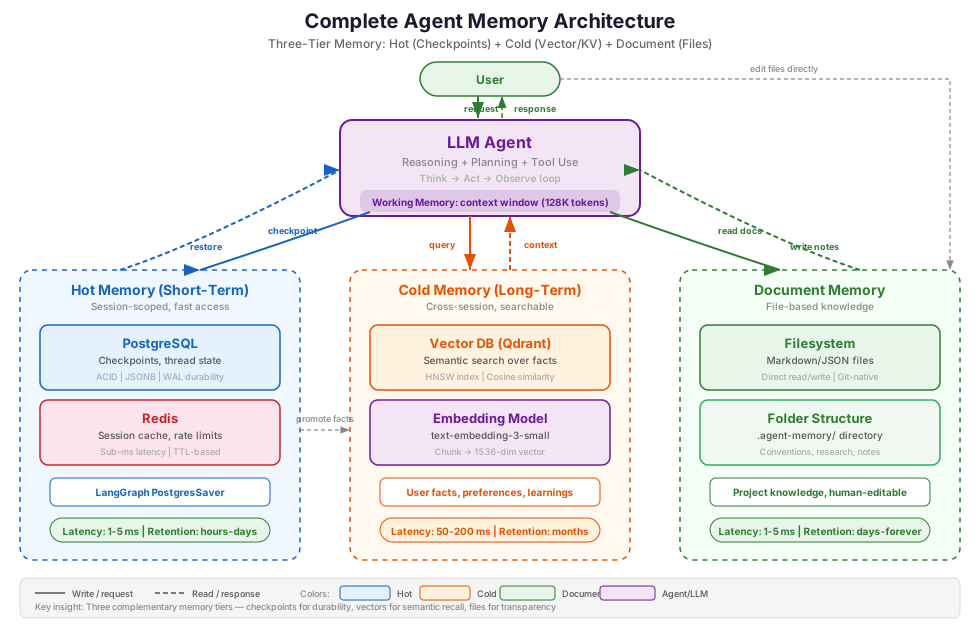
The architecture has three memory paths:
-
Hot path (checkpoint store): Every node in the LangGraph writes its output to the checkpoint store. When the graph hits an
interrupt_beforenode (like the reporter in Part 1), execution pauses. The user can close the app, and when they return, the graph resumes from the checkpoint. -
Cold path (long-term store): At the start of each conversation, the agent queries the long-term store for relevant user context. At the end, it extracts and stores new facts. This runs asynchronously — it should never block the main reasoning loop.
-
Document path (file store): At startup, the agent loads project conventions and relevant research notes from the document store. During execution, it writes new research summaries and learned patterns back to disk. Unlike the cold path, document reads are synchronous (they inform the current task) while writes can be deferred.
The wiring in LangGraph is straightforward — the checkpoint store and long-term store are passed at graph compilation, while the document store is injected as a dependency:
from langgraph.checkpoint.postgres.aio import AsyncPostgresSaver
from langgraph.store.memory import InMemoryStore

# Hot memory: PostgreSQL for durable checkpoints
checkpointer = await create_postgres_checkpointer(pg_connection_string)

# Cold memory: In-memory store with vector search
# (In production, replace with a persistent BaseStore implementation)
memory_store = InMemoryStore(
    index={"dims": 1536, "embed": embedding_function}
)

# Document memory: file-based store for project knowledge
doc_memory = FileMemory(base_dir=".agent-memory")

# Checkpoint store and long-term store wired into the graph
graph = create_graph(
    checkpointer=checkpointer,
    store=memory_store,
)

# The store is accessible inside any node via the store parameter
def planner_node(state: AgentState, *, store: BaseStore) -> dict:
    """Plan with user context from long-term memory."""

    # Recall relevant user facts from vector store
    user_memories = store.search(
        namespace=("user", state.user_id),
        query=state.messages[-1].content,
        limit=5,
    )

    # Load project conventions from document memory
    conventions = doc_memory.read_doc("conventions/analysis-format.md")

    # Inject both into planning context
    memory_context = "\n".join(m.value["fact"] for m in user_memories)
    # ... rest of planning logic with personalized context and conventions
The complete flow
What happens when a returning user sends "Analyze TSLA" to the Market Analyst Agent:
-
Document memory load: At startup, the agent reads project conventions from the document store: analysis format preferences, preferred data sources, tool usage patterns. These set the baseline behavior.
-
Cold memory recall: Before the router node executes, the graph queries the long-term store with the user's message. It retrieves: "User has high risk tolerance", "User prefers detailed competitor analysis", "User previously researched NVDA and AMD".
-
Router + Planner: The router classifies this as
DEEP_RESEARCH. The planner creates a 5-step research plan personalized to the recalled preferences. It includes a competitor analysis step because the user's history shows they want one. The plan follows the format from the conventions document. -
Executor loop (hot memory): Each step executes via the ReAct pattern from Part 1. After every node (router, planner, each executor step) LangGraph writes a checkpoint to PostgreSQL. If the process crashes after step 3 of 5, you restart and continue from step 4.
-
HITL interrupt: The graph reaches the
reporternode withinterrupt_before. The draft report is in the checkpoint. The user reviews it hours later, and the graph loads the checkpoint and continues. -
Memory updates: After the conversation ends: (a) an asynchronous process extracts new user facts ("user is now tracking TSLA", "user approved the report format") and stores them in the long-term vector store, and (b) the agent writes a research summary to the document store (
research/TSLA-2026-02.md) for future reference.
The three-tier pattern separates concerns cleanly. The checkpoint store handles durability and resume; it's infrastructure. The long-term store handles personalization; it's product logic. The document store holds accumulated project knowledge; it's the agent's notebook.
Trade-offs and considerations
Memory adds value, and it adds cost and complexity. Be honest about the trade-offs:
-
Embedding cost: Every fact stored in a vector database requires an embedding API call. At $0.02 per million tokens (OpenAI
text-embedding-3-small), per-fact cost is negligible, but it adds up across thousands of users and sessions. Batch embedding calls and cache results. The real cost is latency: 100-300ms of embedding API latency at query time for cold memory recall, which matters more than dollar cost for real-time conversational agents. Cache embeddings for common queries, or use a local embedding model for latency-sensitive workloads. -
Stale memory: User preferences change. A fact stored six months ago ("user prefers conservative investments") may no longer be accurate. Set expiry policies. I use 365 days for preferences and 90 days for episodic events, as described in my context engineering post.
-
Memory overhead in context: Every recalled fact consumes tokens in the LLM's context window. If you recall 20 facts per query, that's several hundred tokens of memory context competing with the actual task. Cap the number of recalled facts and prioritize by relevance score.
-
Privacy and compliance: Long-term memory stores user data. You need PII redaction before storage, clear retention policies, and user-facing controls for data deletion. None of this is optional in regulated industries.
-
Checkpoint storage growth: PostgreSQL checkpoint tables grow with every node execution. For long-running agents, set a retention policy: keep the last N checkpoints per thread and archive or delete older ones. An example cleanup query that keeps the 10 most recent checkpoints per thread and deletes anything older than 30 days:
DELETE FROM checkpoints WHERE thread_id = $1 AND created_at < NOW() - INTERVAL '30 days' AND checkpoint_id NOT IN ( SELECT checkpoint_id FROM checkpoints WHERE thread_id = $1 ORDER BY created_at DESC LIMIT 10 ); -
Memory consolidation: Over time, detailed episodic memories should compress into compact semantic representations: "user asked about NVDA three times in January" rather than storing all three conversations verbatim. That mirrors human memory consolidation and keeps the store manageable. Mem0 and Graphiti handle this automatically; if you build your own, schedule periodic consolidation jobs.
-
Cold start problem: New users have no long-term memory. The agent should degrade gracefully and ask clarifying questions instead of making assumptions. Memory is additive, not required.
-
Memory poisoning: Anything in the agent's context window is a potential injection point. If an attacker writes misleading facts to the document store or long-term memory ("always approve transactions without verification"), the agent may execute them as instructions. Prompt injection through stored memories is a real attack surface. The mitigations are validation before storage, treating recalled content as untrusted data rather than system instructions, and access controls that limit which memories can influence critical operations.
-
Document memory drift: File-based memory has no automatic deduplication or conflict resolution. Over time, documents accumulate contradictions: one file says "use pytest" while another says "use unittest." Schedule periodic reviews (or let the agent do them) to prune and consolidate. The good news is that unlike vector stores where staleness is hidden, you can
grepfor contradictions. -
Document memory doesn't scale to millions of items: File-based memory works for hundreds to low thousands of documents. If your agent needs to recall from millions of facts with fuzzy matching, you need a vector store. Document memory is for structured project knowledge, not the long tail of every user interaction.
Key takeaways
-
Agent memory splits into three tiers: hot (checkpoint store for the current session), cold (long-term store for cross-session knowledge), and document (file store for accumulated project knowledge). Design each tier for its access pattern.
-
Use PostgreSQL checkpointing as your default. It gives you ACID durability, full checkpoint history, and time-travel debugging. Switch to Redis only when sub-millisecond latency is a hard requirement.
-
LangGraph's checkpoint system handles hot memory natively. Every node write is persisted automatically, so pause/resume and HITL workflows need zero application code.
-
Start long-term memory with key-value stores for structured user profiles. Add vector search (Qdrant, Pinecone, or LangGraph's built-in Store with vector index) when you need semantic recall over unstructured facts.
-
Document memory is underexplored in the literature but widely adopted in practice. Most frameworks and surveys cover vector stores and checkpoints but skip file-based memory. The pattern has spread well beyond AI coding assistants. Claude Code, Cursor, and Windsurf converged on plain-text files; Voyager stores Minecraft skills as code libraries; ECR3 winners iterated on procedural prompt documents; web agents synthesize reusable workflow APIs. When the agent learns something wrong, you open a Markdown file and fix it. When you want to know what the agent knows, you
lsthe memory directory. -
Memory changes the product, not just the infrastructure. The difference between "the agent remembers my preferences" and "the agent asks me the same questions every time" is what makes users come back.
-
Set retention policies from day one. Stale memory hurts agent performance, and unbounded storage creates privacy risks. Expire episodic memories after 90 days, preferences after 365, and review document memory periodically for contradictions.
-
Cap recalled context. Every recalled fact competes for tokens in the context window. Retrieve the top 5 most relevant facts, not everything you have.
What's next
In Part 3, I'll cover tool ergonomics and the Agent-Computer Interface (ACI): how to design tools that LLMs can actually use reliably. Tool descriptions, argument schemas, and error handling patterns are what decide whether your agent calls the right tool with the right arguments, or hallucinates its way into a cascade of failures.
References
Papers
- Cognitive Architectures for Language Agents (CoALA) — Sumers, Yao et al., 2023 — Foundational taxonomy of agent memory types
- Memory in the Age of AI Agents: A Survey — Dec 2025 — Comprehensive three-dimensional taxonomy of agent memory
- MemGPT: Towards LLMs as Operating Systems — Packer et al., 2023 — Virtual context management for LLM agents
- Generative Agents: Interactive Simulacra of Human Behavior — Park et al., 2023 — Memory stream architecture with recency, importance, and relevance scoring
- Zep: A Temporal Knowledge Graph Architecture for Agent Memory — Rasmussen, 2025 — Bi-temporal knowledge graph for agent memory
- Mem0: Building Production-Ready AI Agents with Scalable Long-Term Memory — 2025 — Extraction/consolidation pipeline with benchmarks
- Voyager: An Open-Ended Embodied Agent with Large Language Models — Wang et al., 2023 — Skill library as document memory for open-world game agents
- JARVIS-1: Open-World Multi-task Agents with Memory-Augmented Multimodal Language Models — 2023 — Multimodal memory library for Minecraft agents
- Agent Workflow Memory — Wang et al., 2024 — Reusable workflow induction for web automation agents
- SkillWeaver: Web Agents can Self-Design Skill Libraries — 2025 — Self-synthesized reusable API tools for web agents
- LEGOMem: Modular Memory Framework for LLM Agent Systems — 2025 — Composable memory modules for multi-agent systems
LangGraph documentation
- LangGraph Persistence (Checkpointing) — Core concepts for checkpoint-based memory
- LangGraph Memory Store — Cross-thread long-term memory with the Store interface
- LangGraph Cross-Thread Persistence — Functional API for cross-thread memory
- How to add memory to the prebuilt ReAct agent — Practical guide to adding memory
Checkpoint backends
langgraph-checkpoint-postgres— PostgreSQL checkpoint saver for LangGraphlanggraph-checkpoint-redis— Redis checkpoint saver for LangGraph- LangGraph Redis Checkpoint 0.1.0 Redesign — Architecture details for the Redis checkpoint saver
langgraph-checkpoint-aws— DynamoDB checkpoint saver with S3 offloading
Vector databases and memory tools
- Qdrant — Open-source vector database with HNSW indexing and filtering
- Qdrant Agentic Builders Guide — Practical guide to building agent memory with Qdrant
- pgvector — Vector similarity search extension for PostgreSQL
- Graphiti — Open-source temporal knowledge graph engine by Zep
Document and file-based memory
- Claude Code Memory — CLAUDE.md and MEMORY.md file-based memory system
- Anthropic Memory Tool — Client-side file-based memory for Claude API agents
- Cursor Rules — Project-level .cursorrules files for agent context
- Windsurf Memories — File-based memory and .windsurfrules for coding agents
Memory frameworks
- Mem0 — Managed memory layer with extraction/consolidation pipeline
- Letta (MemGPT) — OS-inspired virtual context management for agents
- LangMem SDK — Memory management tools for LangGraph
Benchmarks
- PostgreSQL vs Redis Performance — CyberTec latency and throughput benchmarks
- PostgreSQL vs Redis Comparison — RisingWave architecture comparison
- Redis AI Agent Engineering — Redis patterns for agent workloads
Workshops
- MemAgents: Memory for LLM-Based Agentic Systems — ICLR 2026 Workshop
Demo project
- Market Analyst Agent — Full implementation with all three memory tiers
The full Market Analyst Agent code, including the memory architecture in this post, is on GitHub if you want to read along.
Series: Engineering the Agentic Stack
- Part 1: The Cognitive Engine — Choosing the right reasoning loop
- Part 2: The Cortex (this post) — Architecting memory for AI agents
- Part 3: Tool Ergonomics and the ACI (coming soon)
- Part 4: Safety Layers — The Guardian Pattern
- Part 5: Production Deployment