Skip to content

2025

Schema-Guided Reasoning on vLLM — Turning LLMs into Reliable Business Logic Engines

TL;DR

Schema-Guided Reasoning (SGR) is a technique that forces LLMs to reason through predefined steps by enforcing structured output schemas. Instead of hoping the model follows your formatting instructions, you guarantee it with constrained decoding. Combined with vLLM's xgrammar backend, you get 100% valid JSON output with near-zero latency overhead.

The problem: You build an LLM-powered agent. It works in demos. In production, it outputs malformed JSON, skips reasoning steps, and gives inconsistent responses. You add retry loops, validation layers, larger models. Costs explode.

The fix: Define your reasoning topology as a Pydantic schema. Let xgrammar enforce it at the token generation level. The LLM physically cannot produce invalid output.
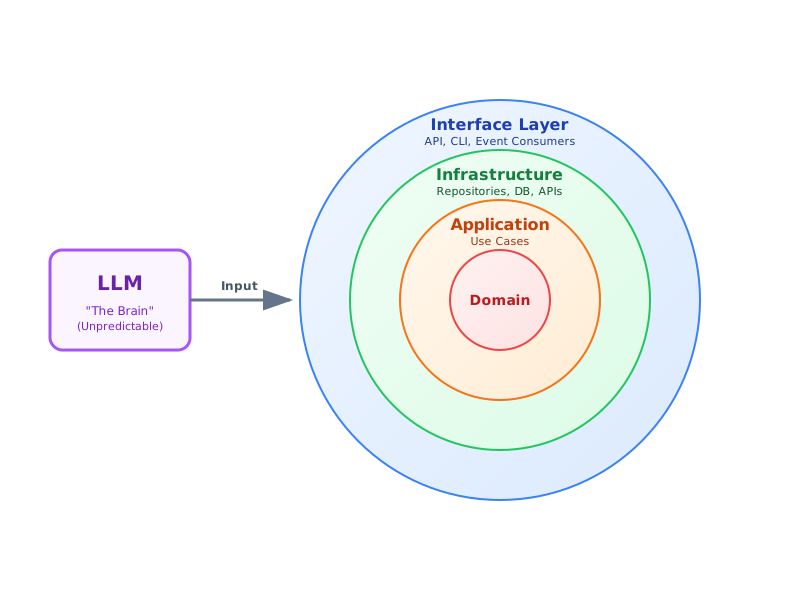
LoRAX Playbook - Orchestrating Thousands of LoRA Adapters on Kubernetes

Serving dozens of fine-tuned large language models used to mean provisioning one GPU per model. LoRAX (LoRA eXchange) flips that math on its head: keep a single base model in memory and hot-swap lightweight LoRA adapters per request.

This guide shows you how LoRAX achieves near-constant cost per token regardless of how many fine-tunes you're serving. We'll cover:

  • What LoRA is and why it matters.
  • LoRAX vs. vLLM: When to use which.
  • Kubernetes Deployment: A production-ready Helm guide.
  • API Usage: REST, Python, and OpenAI-compatible examples.

Context Engineering in the Agentic‑AI Era — and How to Cook It

TL;DR

Context engineering (the context layer) is the pipeline that selects, structures, and governs what the model sees at the moment of decision: Instructions, Examples, Knowledge, Memory, Skills, Tools, Guardrails. Agentic systems live or die by this layer. Below is a field‑tested blueprint and patterns.

The problem: You build an agent. It works in demos, fails in production. Why? The model gets the wrong context at the wrong time—stale memory, irrelevant docs, no safety checks, ambiguous instructions.

The fix: Design the context layer deliberately. This guide shows you how.

Choosing the Right Open-Source LLM Variant & File Format


Why do open-source LLMs have so many confusing names?

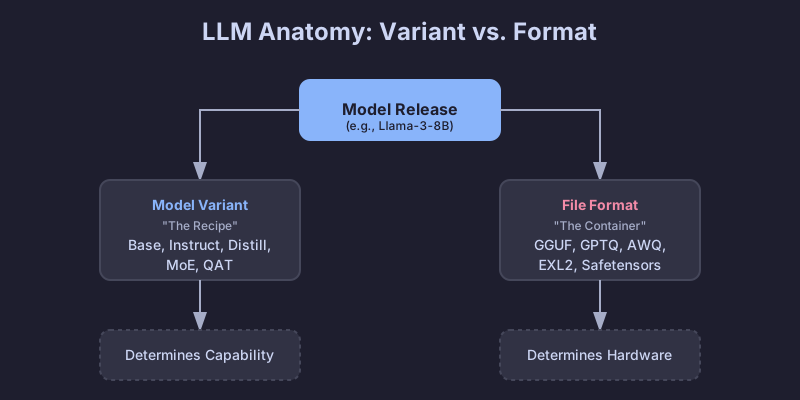
You've probably seen model names like Llama-3.1-8B-Instruct.Q4_K_M.gguf or Mistral-7B-v0.3-A3B.awq and wondered what all those suffixes mean. It looks like a secret code, but the short answer is: they tell you two critical things.

Open-source LLMs vary along two independent dimensions:

  1. Model variant – the suffix in the name (-Instruct, -Distill, -A3B, etc.) describes how the model was trained and what it's optimized for.
  2. File format – the extension (.gguf, .gptq, .awq, etc.) describes how the weights are stored and where they run best (CPU, GPU, mobile, etc.).

The variant determines what the model can do; the format determines where it runs efficiently.

LLM Variant vs Format

Understanding both dimensions helps you avoid downloading 20 GB of the wrong model at midnight and then spending hours debugging CUDA errors.

Quick-guide on Local Stable-Diffusion Toolkits for macOS

Your Mac can run Stable Diffusion models locally — no cloud costs, full privacy, no restrictions. But the number of available tools makes choosing one harder than it should be.

Below is a practical guide to the best macOS-ready interfaces. Each tool wraps the same underlying models but offers a completely different experience — from drag-and-drop simplicity to node-based visual programming.

The Ultimate Guide to pyproject.toml

TL;DR

Think of pyproject.toml as the package.json for Python. It's a single configuration file that holds your project's metadata, dependencies, and tool settings. Whether you use .venv, pyenv, or uv, this one file simplifies development and makes collaboration smoother.

Mastering Zsh Startup: ~/.zprofile vs ~/.zshrc 🚀

If you've ever wondered why your terminal feels slow, or why your environment variables aren't loading where you expect them to, you're likely battling the Zsh startup order.

The distinction between ~/.zprofile and ~/.zshrc is one of the most common sources of confusion for developers moving to Zsh (especially on macOS).

TL;DR ⚡

  • ~/.zprofile is for Environment Setup. It runs once when you log in (or open a terminal tab on macOS). Put your PATH, EDITOR, and language version managers (like fnm, pyenv) here.
  • ~/.zshrc is for Interactive Configuration. It runs every time you start a new shell instance. Put your aliases, prompt themes, and key bindings here.