The Ultimate Guide to pyproject.toml
If you've ever opened a Python project and tried to figure out where dependencies, build settings, and tool configs actually live, you know the pain. setup.py, setup.cfg, requirements.txt, MANIFEST.in, plus a handful of dotfiles for every linter and formatter — all reading from different places.
pyproject.toml collapses most of that into one file.
TL;DR
pyproject.toml is roughly the package.json for Python. One file holds your project metadata, dependencies, and tool settings. Whether you're using .venv, pyenv, or uv, putting everything here makes setup and collaboration easier.
What is pyproject.toml?
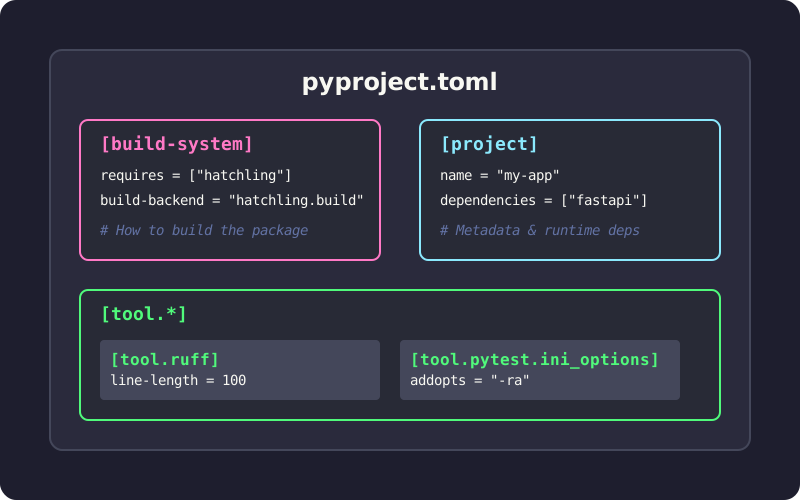
It's a configuration file that lives at the root of your Python project, written in TOML (think INI files, but with a real spec). Two PEPs shaped what it does today:
- PEP 518 (2016) introduced the
[build-system]table so build tools could declare their requirements in a standard way. - PEP 621 (2020) added the
[project]table for core package metadata: name, version, dependencies, that sort of thing.
Today most Python tooling (Black, isort, pytest, Ruff, mypy) reads its configuration from [tool.*] sections in this file.
Why it matters
Fewer files to chase
A typical legacy project juggled setup.py, setup.cfg, requirements.txt, MANIFEST.in, and a flock of dotfiles (.flake8, .coveragerc, and similar). Most of those collapse into one place.
Backend-agnostic builds
When you run pip install ., pip reads pyproject.toml and installs whatever build tools your project needs: setuptools, flit, hatchling, take your pick. You're no longer locked into setuptools.
One place for tool configuration
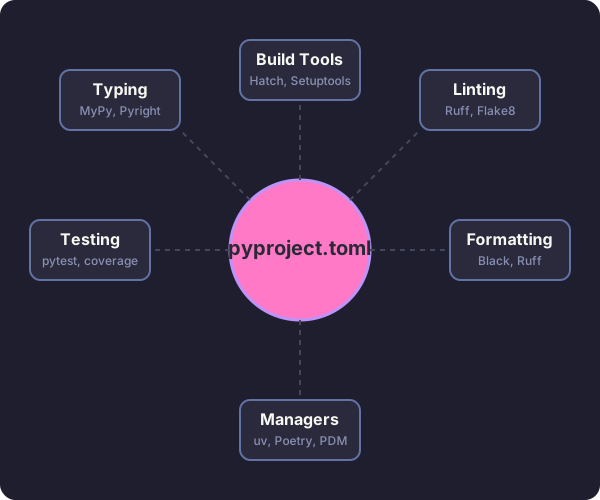
Linters, formatters, test runners, and type checkers all know to look here. Your IDE, CI pipeline, and teammates read from the same file.
Anatomy of a pyproject.toml
A typical file has three main sections:
# 1. Build system - tells pip/build how to package your project
[build-system]
requires = ["hatchling"]
build-backend = "hatchling.build"

# 2. Project metadata and dependencies
[project]
name = "awesome-app"
version = "0.1.0"
description = "Short demo of pyproject.toml"
readme = "README.md"
requires-python = ">=3.12"
dependencies = [
  "fastapi>=0.111",
  "uvicorn[standard]>=0.30",
]

# Expose CLI commands
[project.scripts]
awesome-cli = "awesome_app.cli:main"

# Optional dependencies (e.g., for development)
[project.optional-dependencies]
dev = ["pytest", "ruff", "mypy"]

# 3. Tool configuration
[tool.ruff]
line-length = 100
target-version = "py312"

[tool.pytest.ini_options]
addopts = "-ra -q"
testpaths = ["tests"]
Breaking it down
[build-system]
Required if you want to package or distribute your project. Tells pip and build tools (like python -m build) which backend to use.
[project]
Your package metadata. This is where dependencies live instead of requirements.txt.
dependencies: the runtime requirements for your package.optional-dependencies: groups of extra dependencies (dev,test,docs).scripts: creates executable commands. In the example above, installing the package gives you anawesome-clicommand that runs themainfunction inawesome_app/cli.py.
[tool.*]
Configuration for any tool that supports it. Each tool gets its own namespace: [tool.pytest.ini_options], [tool.mypy], [tool.ruff], and the rest.
Does it replace requirements.txt?
For modern workflows, yes. Tools like Poetry, PDM, Hatch, and uv store dependencies directly in the [project] section and generate lockfiles for reproducibility.
You probably still want requirements.txt if:
- You're working with a legacy deployment system that expects it.
- You have a CI script that hasn't been updated yet.
Most modern tools can export one from your pyproject.toml when needed:
uv export > requirements.txt
Choosing a build backend
The build backend is one of the more confusing decisions. Here's a quick comparison:
| Backend | Best for | Pros | Cons |
|---|---|---|---|
| Hatchling | Modern standard | Fast, extensible, supports plugins | Newer, less legacy support |
| Flit | Simple packages | Extremely simple, zero config | Not for complex builds (C extensions) |
| Setuptools | Legacy, complex | Supports everything (C extensions, etc.) | Slower, more configuration |
| Poetry | Poetry users | Integrated with Poetry's ecosystem | Locked into the Poetry workflow |
For new pure-Python projects, Hatchling is a reasonable default. It's what uv init writes for you.
Migrating an existing project
If you have a legacy Python project, here's how to modernize it:
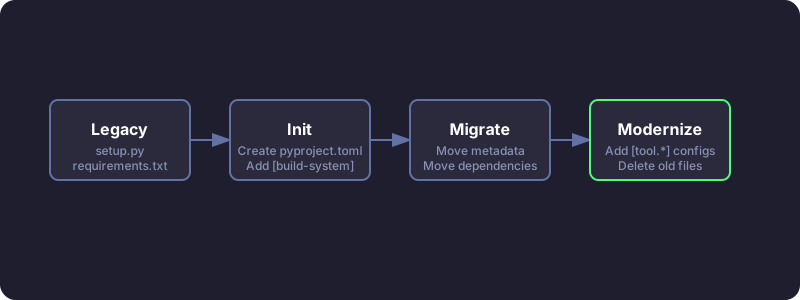
- Add
[build-system]. If you're not sure which backend to use, start withrequires = ["setuptools>=61", "wheel"]. - Move metadata to
[project]. Transfer name, version, and dependencies fromsetup.pyorsetup.cfg. - Convert dev dependencies. Put them in
[project.optional-dependencies].dev. - Configure tools. Add
[tool.*]sections for Black, pytest, mypy, etc. - Decide what to do with
requirements.txt. Either drop it, or generate it from your lockfile for legacy systems that need it.
After migration, you can usually delete setup.py, setup.cfg, and most of those config dotfiles.
A few useful features
CLI entry points
Instead of the old console_scripts block in setup.py, use [project.scripts]:
[project.scripts]
my-tool = "my_package.main:run"
When someone installs your package, they can type my-tool in their terminal.
Workspaces (monorepos)
Tools like uv and hatch support workspaces, which let you manage multiple packages in a single repo:
[tool.uv.workspace]
members = ["packages/*"]
You can develop several interdependent packages and install them all into one virtual environment for testing.
Typical workflows with uv
Starting a new project
uv init my_app          # creates folder with pyproject.toml and .venv
cd my_app
uv add requests fastapi # adds to [project.dependencies] and installs
uv run pytest           # runs tests in the venv
Running scripts
You can either define scripts in pyproject.toml (using a task runner like poe or hatch) or just call uv run:
uv run python main.py
Practical tips
- Don't pin exact versions in libraries. Use ranges like
requests>=2.30so your library doesn't fight with whatever else is installed in someone's environment. - Do pin versions in applications. Use a lockfile (
uv.lock,poetry.lock) for reproducible builds. - Group dev dependencies. Keep testing, linting, and docs dependencies in separate optional groups (
dev,test,docs). - Don't dump every option into
pyproject.toml. Stick to project-wide defaults and let tool-specific config files handle the rest if it gets messy.
The real win from pyproject.toml is mostly removing small, daily friction. You stop hunting for which file owns the build. The linter config sits next to the dependencies. Pip and your IDE finally agree about what's installed. Pick a build backend, put your dependencies in [project], and let your tools read from one place. If you're starting fresh, uv init gets you most of the way there in a single command.