LoRAX Playbook - Orchestrating Thousands of LoRA Adapters on Kubernetes
Serving dozens of fine-tuned large language models used to mean one GPU per model. LoRAX (LoRA eXchange) keeps a single base model in memory and hot-swaps lightweight LoRA adapters per request. Cost per token stays roughly flat as you add fine-tunes.
This guide covers what LoRA is, when to pick LoRAX over vLLM, how to deploy it on Kubernetes with the official Helm chart, and how to call the REST, Python, and OpenAI-compatible APIs.
Background: what is LoRA?
Low-Rank Adaptation (LoRA) freezes the pre-trained model weights and injects small rank-decomposition matrices into each Transformer layer. Instead of retraining the whole model, you train a small set of "diffs" that capture the new behavior.
A full fine-tune of a 7B model is a 20GB+ file. A LoRA adapter for the same model is around 100MB. That difference is what makes dynamic serving possible: you can keep thousands of adapters on disk and load one into GPU memory in milliseconds.
The problem LoRAX solves
Multi-model serving the traditional way is expensive. Each fine-tuned model needs its own GPU memory, so serving 50 customer-specific models takes 50 deployments, or at least 50× the memory. Cost scales linearly with every new variant.
LoRAX is an Apache 2.0 project from Predibase. It extends the Hugging Face Text Generation Inference server with dynamic adapter loading, tiered weight caching, and multi-adapter batching. Together those let you serve hundreds of tenant-specific LoRA adapters on a single Ampere-class GPU without losing throughput or latency.
The trick: LoRA fine-tuning produces small delta weights rather than full model copies. LoRAX keeps only the base model resident on the GPU and injects adapter weights on demand. Adapters that aren't being used cost nothing in VRAM.
How it works
Dynamic adapter loading
Adapter weights are injected just in time for each request. The base model stays resident in GPU memory while adapters load on the fly without blocking other requests. You can catalog thousands of adapters but only pay memory costs for the ones actively serving traffic.
Tiered weight caching
LoRAX stages adapters across three layers: GPU VRAM for hot adapters, CPU RAM for warm ones, and disk for cold storage. The hierarchy avoids out-of-memory crashes and keeps swap times fast enough that users do not notice.
Continuous multi-adapter batching
This is where LoRAX changes the batching behavior. It extends continuous batching to work across different adapters in parallel, so requests targeting different fine-tunes can share the same forward pass. Predibase benchmarks show that processing 1M tokens spread across 32 different adapters takes roughly the same time as 1M tokens on a single model.
TGI underneath
LoRAX builds on Hugging Face's Text Generation Inference (TGI), so you inherit TGI's optimizations: FlashAttention 2, paged attention, SGMV kernels for multi-adapter inference, and streaming responses. It is TGI plus dynamic adapter switching.
Cost per token stays roughly flat
The chart makes the point. Dedicated deployments (dark gray) scale linearly: double the models, double the cost. LoRAX (orange) keeps per-token cost nearly flat as you add adapters. Even hosted API fine-tunes from providers like OpenAI (light gray) cannot match it for multi-model workloads.
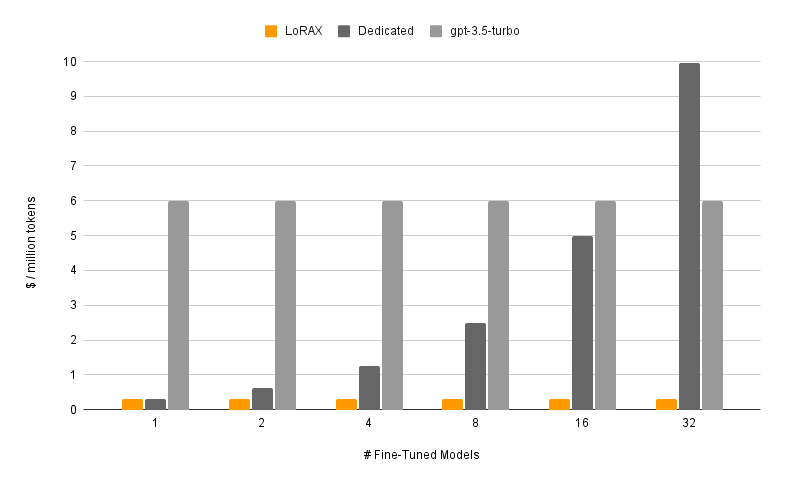
Cost per million tokens as you serve more fine-tuned models. LoRAX stays nearly flat through multi-adapter batching; dedicated deployments scale linearly. Source: LoRAX GitHub.
Request flow

When to use LoRAX
LoRAX makes sense in a few specific situations.
- Multi-tenant SaaS. You are building a platform where each of 500 customers gets a chatbot fine-tuned on their data. The traditional approach asks for 500 model deployments. LoRAX serves all 500 from one GPU by loading the relevant adapter when a customer request arrives.
- Domain-specific expert routing. You maintain specialized LLMs for law, medicine, finance, and engineering. Instead of four separate 13B deployments, LoRAX runs one base LLaMA 2 13B and routes to the right adapter based on the request domain.
- Rapid experimentation. Testing 10 fine-tuning approaches in production? Deploy LoRAX once and switch between variants by changing the
adapter_idparameter. No infrastructure changes or service restarts. - Resource-constrained or edge deployments. A single NVIDIA A10G can host a quantized 7B base model plus dozens of task-specific adapters, instead of one GPU per model.
Architecture: memory hierarchy and request scheduling
LoRAX is built around a three-tier memory hierarchy. Understanding it helps you predict performance and plan capacity.
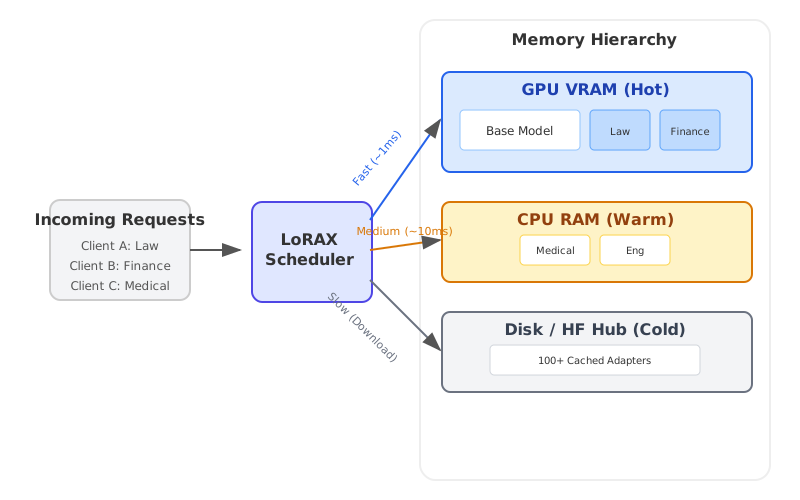
LoRAX treats each adapter as a lightweight "view" on the shared base model. The scheduler coalesces requests so that serving 32 different adapters can be as fast as serving one, even at a million tokens of throughput. Adapters typically weigh 10–200MB each, against multi-gigabyte full models.
Deploy LoRAX on Kubernetes
LoRAX ships with Helm charts and Docker images, so Kubernetes deployment is straightforward.
Prerequisites
You will need:
- A Kubernetes cluster with NVIDIA GPUs (Ampere generation or newer: A10, A100, H100)
- NVIDIA Container Runtime configured on GPU nodes
kubectlandhelminstalled locally- Persistent storage for adapter caches; mount a PersistentVolume to
/datain the pod
Quick start with the official Helm chart
Helm is the package manager for Kubernetes. It bundles all the Kubernetes resources an application needs (Deployments, Services, ConfigMaps, etc.) into a single "chart," so you can deploy the whole thing with one command instead of managing dozens of YAML files by hand.
Predibase retired their public Helm repository in late 2024, so the supported workflow is to clone the LoRAX repository and install the chart from disk. Run these commands from your workstation:
# Clone the LoRAX repository and switch into it
git clone https://github.com/predibase/lorax.git
cd lorax

# Make sure kubectl can talk to your cluster
kubectl config current-context
kubectl get nodes

# Build chart dependencies (generates charts/lorax/charts/*.tgz)
helm dependency update charts/lorax

# Optional: render manifests locally to verify everything is templating
helm template mistral-7b-release charts/lorax > /tmp/lorax-rendered.yaml

# Deploy with default settings (Mistral-7B-Instruct)
helm upgrade --install mistral-7b-release charts/lorax

# Watch the pod come up
kubectl get pods -w

# Check logs to see model loading progress
kubectl logs -f deploy/mistral-7b-release-lorax
The chart creates a Deployment (one replica by default) and a ClusterIP Service listening on port 80. The first startup downloads the base model from Hugging Face and loads it into GPU memory, which can take a few minutes depending on your network and GPU. Subsequent restarts reuse the cached weights from the persistent volume.
Tip: If
helm upgrade --installreturnsKubernetes cluster unreachable, your kubeconfig context points at a cluster that is offline. Start your local cluster (Docker Desktop, kind, minikube) or switch to a reachable context withkubectl config use-context. Runningkubectl get nodesbefore deploying confirms the API server is up.
Customize the base model and scaling
You can swap in a different base model or adjust resources by creating a custom values file. Here is an example llama2-values.yaml:
# Use LLaMA 2 7B Chat instead of Mistral
modelId: meta-llama/Llama-2-7b-chat-hf

# Enable 4-bit quantization to save VRAM
modelArgs:
    quantization: "bitsandbytes"

# Scale to 2 replicas for high availability
replicaCount: 2

# Request exactly 1 GPU per pod
resources:
    limits:
        nvidia.com/gpu: 1
Deploy with your custom configuration:
helm upgrade --install -f llama2-values.yaml llama2-chat-release charts/lorax
Run those commands from the cloned lorax/ repository so Helm can locate the chart directory.
LoRAX supports the popular open-source models out of the box: LLaMA 2, CodeLlama, Mistral, Mixtral, Qwen, and others. Check the model compatibility list for the latest additions.
Exposing the service
The default Service type is ClusterIP, which only allows access from within the cluster. For external traffic, either:
- Create a LoadBalancer Service (on cloud providers)
- Set up an Ingress with TLS termination
- Place an API gateway in front for authentication and rate limiting
Cleanup
When you are done testing, free up the GPU resources:
helm uninstall mistral-7b-release
This removes the Deployment, Service, and all pods. Cached model weights stay in the PersistentVolume unless you delete it separately.
Working with the LoRAX APIs
Once deployed, LoRAX exposes three ways to interact with it: a REST API compatible with Hugging Face TGI, a Python client library, and an OpenAI-compatible endpoint. All three support dynamic adapter switching.
REST API
The /generate endpoint takes JSON payloads with your prompt and optional parameters. Using the base model without any adapter:
# Basic request to the base model (no adapter)
curl -X POST http://localhost:8080/generate \
  -H "Content-Type: application/json" \
  -d '{
    "inputs": "Write a short poem about the sea.",
    "parameters": {
      "max_new_tokens": 64,
      "temperature": 0.7
    }
  }'
The response includes the generated text and metadata like token counts and timing.
Loading a specific adapter
Add an adapter_id parameter to target a fine-tuned model. Here is an example using a math-specialized adapter:
curl -X POST http://localhost:8080/generate \
  -H "Content-Type: application/json" \
  -d '{
    "inputs": "Natalia sold 48 clips in April, and then half as many in May. How many clips did she sell in total?",
    "parameters": {
      "max_new_tokens": 64,
      "adapter_id": "vineetsharma/qlora-adapter-Mistral-7B-Instruct-v0.1-gsm8k"
    }
  }'
On the first call with a new adapter_id, LoRAX downloads the adapter from Hugging Face Hub and caches it under /data. Subsequent requests use the cached version. You can also load adapters from local paths by setting "adapter_source": "local" alongside a file path.
Python client
For programmatic access, install the lorax-client package:
pip install lorax-client
The client wraps the REST API with a clean interface:
from lorax import Client

# Connect to your LoRAX instance (default port 8080)
client = Client("http://localhost:8080")

prompt = "Explain the significance of the moon landing in 1969."

# 1. Generate using the base model (no adapter loaded)
base_response = client.generate(prompt, max_new_tokens=80)
print("Base model:", base_response.generated_text)

# 2. Generate using a fine-tuned adapter
# The adapter_id can be a Hugging Face repo ID or a local path
adapter_response = client.generate(
    prompt,
    max_new_tokens=80,
    adapter_id="alignment-handbook/zephyr-7b-dpo-lora",
)
print("With adapter:", adapter_response.generated_text)
The client supports streaming, decoding parameters (temperature, top-p, repetition penalty), and token-level details. See the client reference for advanced usage.
OpenAI-compatible endpoint
LoRAX implements the OpenAI Chat Completions API under the /v1 path. That lets you drop LoRAX into tools that expect OpenAI's API format: LangChain, Semantic Kernel, or custom applications.
Use the model field to specify which adapter to load:
import openai

# Point the OpenAI client at LoRAX
openai.api_key = "EMPTY"  # LoRAX doesn't require an API key by default
openai.api_base = "http://localhost:8080/v1"

# The model parameter becomes the adapter_id
# This allows seamless integration with tools like LangChain
response = openai.ChatCompletion.create(
    model="alignment-handbook/zephyr-7b-dpo-lora",
    messages=[
        {"role": "system", "content": "You are a friendly chatbot who speaks like a pirate."},
        {"role": "user", "content": "How many parrots can a person own?"},
    ],
    max_tokens=100,
)

print(response["choices"][0]["message"]["content"])
Two practical use cases follow from this:
- Drop-in replacement. Migrate existing applications from OpenAI's hosted models to your own infrastructure by changing one configuration line.
- Tool integration. Use LoRAX with any framework that already supports OpenAI's API, with no custom adapter code.
The first request to a new adapter has higher latency while LoRAX downloads and loads it. Plan for that in user-facing applications by preloading popular adapters or showing a loading state.
Trade-offs
What LoRAX does well
- Many models on one GPU. Hundreds or thousands of fine-tuned models on a single GPU instead of one deployment per model. Cost stays nearly constant as you add adapters.
- No idle memory. Adapters load on demand. Unused models cost nothing in VRAM. You can keep a catalog of 1,000+ specialized models and only pay for the handful actively serving traffic.
- Throughput holds. Continuous multi-adapter batching keeps latency and throughput close to single-model serving. Predibase benchmarks show that serving 32 adapters in parallel adds little overhead over serving one.
- TGI underneath. Built on Hugging Face TGI, so you inherit FlashAttention 2, paged attention, streaming, and SGMV kernels for multi-adapter inference.
- Operationally complete. Docker images, Helm charts, Prometheus metrics, OpenTelemetry tracing. Apache 2.0, so no commercial restrictions.
- Broad model support. Works with LLaMA 2, CodeLlama, Mistral, Mixtral, Qwen, and others. Supports quantization (4-bit via bitsandbytes, GPTQ, AWQ) to cut memory footprint.
Limitations
- LoRA-only. All adapters must come from LoRA-style fine-tuning of the same base model. Full fine-tunes that produce standalone models won't work without conversion. Different base architectures need separate LoRAX deployments.
- Cold start. The first request after startup loads the base model into GPU memory (30–90 seconds for larger models). The first request to a new adapter has download latency from Hugging Face. Plan around this with health checks and preloading.
- Cache thrashing under bursty load. If traffic suddenly hits dozens of different adapters, LoRAX has to shuffle weights between GPU, CPU RAM, and disk. Adapter swaps from RAM are around 10ms, but a very large working set can cause temporary slowdowns. Watch GPU memory and adapter cache hit rates.
- Fast-moving project. LoRAX forked from TGI in late 2023 and changes quickly. Expect frequent updates and occasional breaking changes as it tracks upstream TGI. Pin versions in production.
LoRAX vs. vLLM
vLLM is another high-throughput serving engine, and it added multi-LoRA support more recently. The two solve different problems.
| Feature | LoRAX | vLLM |
|---|---|---|
| Primary focus | Massive scale: hundreds or thousands of adapters | High throughput: maximum tokens/sec for fewer active adapters |
| Architecture | Dynamic swapping; aggressively offloads to CPU/disk | Batching tuned for concurrent execution of active adapters |
| Best for | Long-tail SaaS: 1000s of tenants, sporadic usage | High-traffic tiers: 5–10 heavily used adapters |
| Base | Hugging Face TGI | Custom PagedAttention engine |
Pick LoRAX if you have a long tail of adapters (one per user, most idle most of the time) where tiered caching pays off. Pick vLLM if you have a small set of very active adapters and raw throughput matters most.
Getting started
A practical roadmap from prototype to production:
1. Start small
Deploy LoRAX with the base model you are already using and 3–5 representative adapters. Verify that adapter loading works and measure baseline latency for your workload.
2. Measure and profile
- Track adapter cache hit rates and GPU memory under realistic traffic.
- Identify hot adapters (the top 20% by request volume) and consider preloading them at startup.
- Measure P50, P95, and P99 latency for both cached and cold adapter loads.
3. Optimize for your workload
- If a few adapters are very popular, raise GPU memory allocation to keep more of them hot.
- If usage is long-tailed across hundreds of adapters, tune the tiered cache to balance RAM and disk.
- Use quantization (4-bit bitsandbytes or GPTQ) if VRAM is tight.
4. Scale horizontally
Once single-instance behavior is understood, add replicas for high availability. Put a load balancer in front that routes by adapter_id so requests for the same adapter hit the same replica. That improves cache locality.
5. Monitor
Set up dashboards for GPU utilization, adapter cache metrics, and request latency broken down by adapter. Watch for cache thrashing during traffic spikes and adjust scaling accordingly.
With LoRAX, running N fine-tunes becomes a routing problem on one GPU instead of a provisioning problem on N GPUs.