Quick Guide: Managing Python on macOS with uv
Quick Start
# Install uv
brew install uv

# For new projects (modern workflow)
uv init                # create project structure
uv add pandas numpy    # add dependencies
uv run train.py        # run your script

# For existing projects (legacy workflow)
uv venv                             # create virtual environment
uv pip install -r requirements.txt  # install dependencies
uv run train.py                     # run your script

# Run tools without installing them
uvx ruff check .       # run linter
uvx black .            # run formatter
Why uv?
If you've used Python for a while, you probably juggle pip, virtualenv, pip-tools, pyenv, and poetry depending on the project. uv does what all of those do, with one binary.
It's written in Rust, and on my machine it installs packages roughly 10-100x faster than the old stack. The bigger win for me is that I stopped switching between tools mid-task.
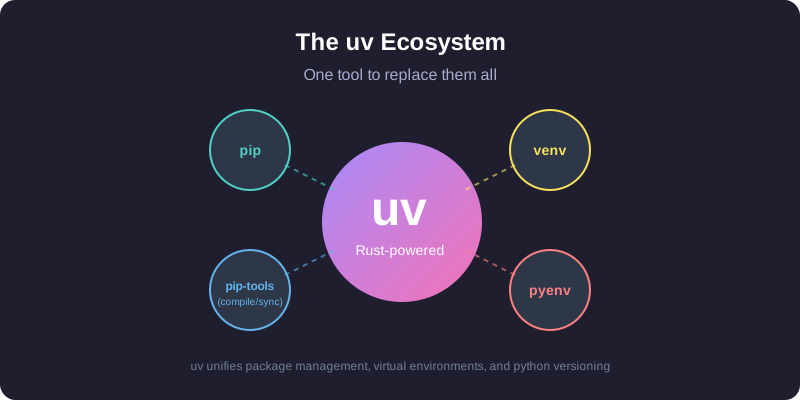
It replaces pip and pip-tools for package management, pyenv for installing Python versions, virtualenv/venv for environments, pipx for running tools, and poetry or pdm for project workflows.
Installing uv
The easiest way to install uv on macOS is via Homebrew:
brew install uv
uv detects your Mac's architecture (Apple Silicon or Intel) automatically, so there's no extra configuration.
To keep it updated:
brew upgrade uv
# OR
uv self update
Core concepts
uv covers three use cases:
- Projects — building an application or library with dependencies.
- Scripts — running a single-file Python script with inline dependencies.
- Tools — running command-line utilities (like
rufforhttpie) globally.
1. Project management
For new projects, uv uses the standard pyproject.toml for configuration and a cross-platform uv.lock for reproducible builds.
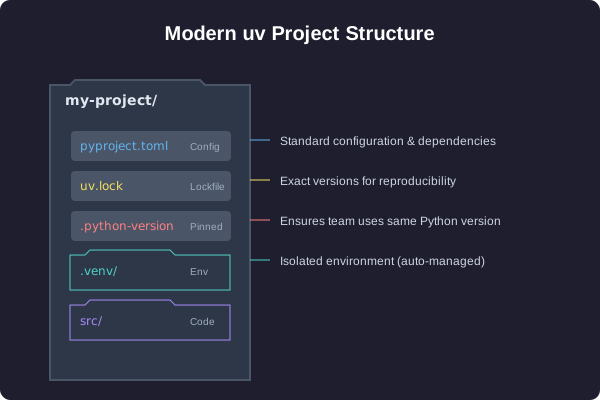
Start a new project:
uv init my-project
cd my-project
This creates a pyproject.toml, a .gitignore, and a hello.py.
Add dependencies:
# Runtime dependencies
uv add pandas requests

# Development dependencies
uv add pytest ruff --dev
Run your code:
uv run hello.py
uv manages the virtual environment in .venv for you. You don't need to activate it manually.
2. Managing Python versions
uv installs and manages Python versions for you, kept in ~/.cache/uv. If you've been using pyenv for this, you can drop it.
Install a specific version:
uv python install 3.12
Pin a version for your project:
uv python pin 3.11
This writes a .python-version file. On the next uv run, it uses the pinned version and downloads it if needed. Your team and CI end up on the same Python version without any extra coordination.
3. Running tools with uvx
uvx (an alias for uv tool run) runs Python command-line tools without adding them to your global environment or project dependencies.
# Run a linter
uvx ruff check .

# Run a formatter
uvx black .

# Start a temporary Jupyter server
uvx --from jupyterlab jupyter lab
Each tool runs in its own temporary environment, so there's no version conflict with whatever your project already has installed.
Legacy projects (requirements.txt)
For an existing project using requirements.txt, uv works as a drop-in replacement for pip and venv.
Set it up:
# Create a virtual environment
uv venv

# Install dependencies
uv pip install -r requirements.txt
Run it:
uv run python app.py
Why it's fast
Three things matter here. It's written in Rust, so there's no Python startup overhead on each invocation. It caches built wheels globally — once numpy is installed in one project, installing it in another is basically instant (on macOS it uses copy-on-write links). And it downloads and installs packages in parallel instead of one at a time.
Summary
| Task | Old way | The uv way |
|---|---|---|
| Install Python | pyenv install 3.12 |
uv python install 3.12 |
| New project | mkdir proj && cd proj && python -m venv .venv |
uv init proj |
| Install package | pip install pandas && pip freeze > requirements.txt |
uv add pandas |
| Run script | source .venv/bin/activate && python script.py |
uv run script.py |
| Run tool | pipx run black |
uvx black |
I switched my Python workflow to uv shortly after it came out and haven't gone back. If you're still on the old stack, give it a try on your next project — that's how I tested it before moving everything over.